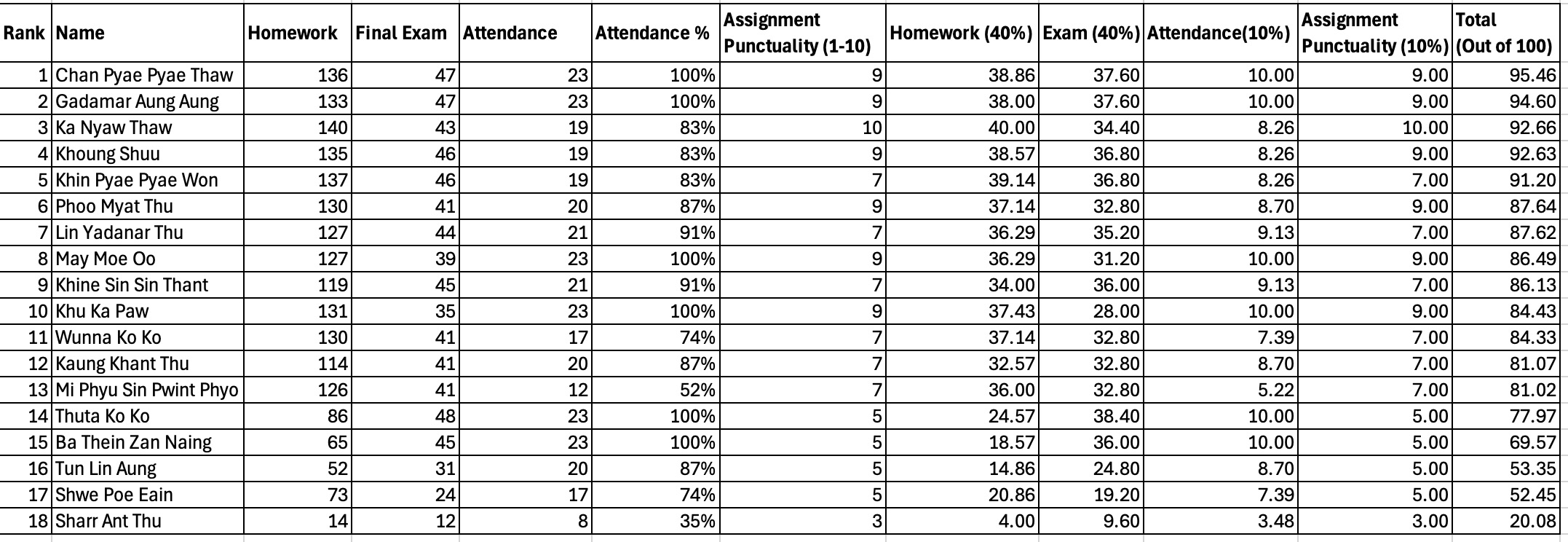
Final Result
Contents
1. Pseudo Code and Flow Chart Exercises
2. Problem Set (Level 1) Basic
3. Problem Set (Level 2) Decision
Additional Decision Making Problems
4. Problem Set (Level 3) Loop 1
5. Problem Set (Level 4) Loop 2
6. Problem Set (Level 5) String
7. Problem Set (Level 6) List
8. Problem Set (Level 7) Function
Revision Zoom Link
Topic: Revision Class
Date: Saturday 7:00 to 8:00PM
Join Zoom Meeting
https://us04web.zoom.us/j/2167326044?pwd=bGJEODVUWTRJVnpIUG9Jeit1UHhpZz09
Meeting ID: 216 732 6044
Passcode: 12345
Pseudo and Flow Chart
(1) Write a pseudo code and draw a flowchart to find the sum of two numbers.
(2) Write a pseudo code and draw a flowchart to calculate the summation, subtraction, multiplication and division of two numbers.
(3) Write a pseudo code to calculate the area of a circle using the formula.
Area = pi * radius * radius. (pi = 3.14)
(4) Write a pseudo code to input the two sides of a rectangle. Calculate the area of the rectangle and print out the answer.
Area = Length * Width
(5) Write a pseudo code to convert the given celcius temperature to fahrenheit.
Tc = 5/9 * (Tf – 32)
(6) Write a pseudocode to convert the given time in hours to minutes.
(7) Write a pseudo code and draw a flowchart to check the given mark is pass or fail. (pass mark is 50)
(8) Write a pseudo code and draw a flowchart to check the input age is eligible for vote or not.
(9) Write a pseudocode and draw a flowchart to input two numbers and print the larger number.
(10) Write a pseudocode and draw a flowchart to check whether the given number is positive, negative or zero.
Problem Set
Level 1
Write a Python program that asks the user to enter two numbers.
Calculate and display the total.
Output
Enter first number: 20
Enter second number: 30
Total = 50
(2) Sum of Three Number (Sum3.py)
Write a Python program that asks the user to enter three numbers.
Calculate and display the total.
Output
Enter first number: 2
Enter second number: 3
Enter third number: 4
2 + 3 + 4 = 9
(3) Four Arithmetic Operations (Four_Operations.py)
Write a Python program that asks the user to enter two numbers.
Calculate and display:
- the sum
- the difference
- the product
- the quotient
Display each answer on a separate line.
Output
Enter first number: 12
Enter second number: 4
Sum = 16
Difference = 8
Product = 48
Quotient = 3.0
(4) Total and Average of Three Numbers (Total_Average3.py)
Write a Python program that asks the user to enter three subject marks.
Calculate and display:
- the total mark
- the average mark
Output
Enter mark for subject 1 : 65
Enter mark for subject 2: 70
Enter mark for subject 3: 67
Total mark is 202
Average mark is 67.3333
(5) Area of a Rectangle (Area_Rectangle.py)
Write a Python program that asks the user to enter the length and width of a rectangle.
Calculate and display the area.
Formula:
Area = length × width
Output
Enter length: 6
Enter width: 4
Area of the rectangle = 24
(6) Hours to Minutes (Hours2Minutes.py)
Write a Python program that asks the user to enter a number of hours.
Convert the time into minutes and display the answer.
Output
Enter hours: 3
Minutes = 180
(7) Feet to Inches (feet_to_inches.py)
Write a Python program that asks the user to enter a length in feet.
Convert the length into inches and display the result.
Output
Enter length in feet: 5
Length in inches = 60
(8) Inches to Feet and Inches (inches_to_feet_and_inches.py)
Write a Python program that asks the user to enter a total inches.
Convert it into:
- feet
- inches
Hint: Use division and remainder.
Output
Enter length in total inches: 65
Answer = 5 feet and 5 inches
(9) Celsius to Fahrenheit
Write a Python program that asks the user to enter a temperature in Celsius.
Convert it to Fahrenheit and display the result.
Formula:
Fahrenheit = (9 / 5 × Celsius) + 32
Output
Enter temperature in Celsius: 30
Temperature in Fahrenheit = 86.0
(10) Area and Perimeter of Circle (Area_Perimeter_Circle.py)
Write a Python program that:
- asks for radius
- calculates both:
- area
- perimeter
- displays both result
Output
Enter radius : 3.5
Area of the circle = 38.465
Perimeter of the circle = 21.98
(11) Total Cost with Discount (Total_Cost_Discount.py)
Write a Python program that:
- asks for the price of one item and quantity
- calculates total cost
- calculates a fixed 10% discount
- displays:
- total cost
- discount amount
- final price
Output
Enter price: 200
Enter quantity: 2
Total = 400
Discount = 40.0
Final price = 360.0
(12) Total Bill with Tax (Bill_With_Tax.py)
Write a Python program that:
- asks for the price of an item
- calculates 5% tax
- displays:
- tax amount
- total price after tax
Output
Enter price: 100
Tax = 5.0
Total price = 105.0
(13) Calculate Total Salary (Total_Salary.py)
Write a Python program that:
- asks for basic salary
- calculates:
- allowance = 20% of salary
- bonus = 10% of salary
- displays total salary
Formula:
Total salary = basic salary + allowance + bonus
Output
Enter basic salary: 1000
Total salary = 1300.0
(14) Decimal Hours to Hours and Minutes (Decimal_Hours_To_HM.py)
Write a Python program that asks the user to enter time in decimal hours.
Convert it into:
- whole hours
- minutes
Output
Enter time in hours: 2.5
Hours = 2
Minutes = 30
(15) Swap Two Variables (swap2variables.py)
Write a Python program that asks the user to enter two numbers.
Display the values of both numbers before swapping.
Then swap the values of the two variables.
Finally, display the values after swapping.
Output
Enter first number: 10
Enter second number: 20
Before swapping:
First number = 10
Second number = 20
After swapping:
First number = 20
Second number = 10
Problem Set
Level 2
1. Positive Number (positive_number.py)
Problem:
Input a number. If the number is positive, display Positive number.
Sample output screen
Enter a number: 8
Positive number
2. Pass Mark Alert (pass_mark_alert.py)
Problem:
Input a mark. If the mark is 50 or above, display You passed.
Sample output screen
Enter your mark: 72
You passed
3. Adult Check (adult_check.py)
Problem:
Input an age. If the age is 18 or above, display Adult.
Sample output screen
Enter your age: 20
Adult
4. Even Number Check (even_number_check.py)
Problem:
Input a number. If the number is even, display Even number.
Sample output screen
Enter a number: 14
Even number
5. Discount Message (discount_message.py)
Problem:
Input the total purchase amount. If the amount is 100000 or more, display Eligible for discount.
Sample output screen
Enter purchase amount: 120000
Eligible for discount
6. Pass or Fail (pass_or_fail.py)
Problem:
Input a mark. If the mark is 50 or above, display Pass. Otherwise, display Fail.
Sample output screen
Enter your mark: 43
Fail
7. Even or Odd (even_or_odd.py)
Problem:
Input a number. If the number is even, display Even. Otherwise, display Odd.
Sample output screen
Enter a number: 17
Odd
8. Eligible to Vote or Not (vote_eligibility.py)
Problem:
Input an age. If the age is 18 or above, display Eligible to vote. Otherwise, display Not eligible to vote.
Sample output screen
Enter your age: 16
Not eligible to vote
9. Larger of Two Numbers (larger_of_two.py)
Problem:
Input two numbers. If the first number is greater than the second, display First number is larger. Otherwise, display Second number is larger or equal.
Sample output screen
Enter first number: 25
Enter second number: 30
Second number is larger or equal
10. Freezing Check (freezing_check.py)
Problem:
Input a temperature. If it is below 0, display Freezing. Otherwise, display Not freezing.
Sample output screen
Enter temperature: -3
Freezing
11. Grade System (grade_system.py)
Problem:
Input a mark.
- 80 and above → Grade A
- 60 to 79 → Grade B
- 40 to 59 → Grade C
- below 40 → Fail
Sample output screen
Enter your mark: 67
Grade B
12. Traffic Light Meaning (traffic_light.py)
Problem:
Input a traffic light color.
- red → Stop
- yellow → Get ready
- green → Go
- anything else → Invalid color
Sample output screen
Enter traffic light color: yellow
Get ready
13. Number Sign (number_sign.py)
Problem:
Input a number.
- greater than 0 → Positive
- less than 0 → Negative
- equal to 0 → Zero
Sample output screen
Enter a number: 0
Zero
14. Movie Ticket Price Category (ticket_category.py)
Problem:
Input age.
- below 12 → Child ticket
- 12 to 59 → Normal ticket
- 60 and above → Senior ticket
Sample output screen
Enter age: 65
Senior ticket
15. Day Type (day_type.py)
Problem:
Input a day number from 1 to 7.
- 1 to 5 → Weekday
- 6 or 7 → Weekend
- otherwise → Invalid day
Sample output screen
Enter day number: 6
Weekend
16. Exam Result with Distinction (exam_distinction.py)
Problem:
Input a mark.
If the mark is 50 or above, the student passes.
Then:
- if the mark is 80 or above, display Pass with distinction
- otherwise, display Pass
If below 50, display Fail
Sample output screen
Enter your mark: 84
Pass with distinction
17. Login Check (login_check.py)
Problem:
Input a username.
If the username is admin, then ask for password.
- if password is 1234, display Login successful
- otherwise, display Wrong password
If username is not admin, display Unknown user
Sample output screen
Enter username: admin
Enter password: 1234
Login successful
18. Scholarship Check (scholarship_check.py)
Problem:
Input a student’s mark.
If the mark is 60 or above, the student passes.
Then:
- if the mark is 90 or above, display Scholarship candidate
- otherwise, display Passed but no scholarship
If below 60, display Failed
Sample output screen
Enter mark: 75
Passed but no scholarship
19. ATM Withdrawal (atm_withdrawal.py)
Problem:
Input account balance and withdrawal amount.
If withdrawal amount is less than or equal to balance:
- if withdrawal amount is less than or equal to 500000, display Withdrawal approved
- otherwise, display Limit exceeded
Otherwise, display Insufficient balance
Sample output screen
Enter balance: 800000
Enter withdrawal amount: 600000
Limit exceeded
20. Club Membership (club_membership.py)
Problem:
Input age.
If age is 18 or above:
- ask if the person has membership card
- if yes, display Entry allowed
- otherwise, display Membership card required
If under 18, display Too young to enter
Sample output screen
Enter age: 21
Do you have membership card (yes/no): no
Membership card required
21. Exam Pass by Two Conditions (exam_pass_conditions.py)
Problem:
Input exam mark and attendance percentage.
If mark is 50 or above and attendance is 75 or above, display Pass.
Otherwise, display Fail.
Sample output screen
Enter exam mark: 62
Enter attendance percentage: 80
Pass
22. Event Entry (event_entry.py)
Problem:
Input age and whether the person has a ticket.
If age is 18 or above and has a ticket, display Entry allowed.
Otherwise, display Entry denied.
Sample output screen
Enter age: 19
Do you have a ticket (yes/no): yes
Entry allowed
23. Weather Advice (weather_advice.py)
Problem:
Input whether it is raining and whether the person has an umbrella.
If it is raining and not carrying an umbrella, display You may get wet.
Else if it is raining and carrying an umbrella, display You are prepared.
Otherwise, display Weather is fine.
Sample output screen
Is it raining (yes/no): yes
Do you have an umbrella (yes/no): no
You may get wet
24. Password Strength (password_strength.py)
Problem:
Input a password.
Check these rules:
- if length is less than 6, display Too short
- else if password is admin or 123456, display Too weak
- otherwise, display Acceptable password
Sample output screen
Enter password: 123456
Too weak
25. Smart Discount System (smart_discount.py)
Problem:
Input purchase amount and whether the customer is a member.
- if purchase amount is 200000 or more and customer is a member, display 20% discount
- else if purchase amount is 200000 or more or customer is a member, display 10% discount
- else, display No discount
Sample output screen
Enter purchase amount: 150000
Are you a member (yes/no): yes
10% discount
Additional Decision Making Problems
26. Leap Year Check (leap_year_check.py)
Problem:
Input a year.
A year is a leap year if:
- it is divisible by 400, or
- it is divisible by 4 but not divisible by 100
Display Leap year or Not a leap year.
Sample output screen
Enter a year: 2024
Leap year
27. Triangle Type Checker (triangle_type.py)
Problem:
Input three side lengths of a triangle.
Check:
- if all three sides are equal, display Equilateral triangle
- if only two sides are equal, display Isosceles triangle
- if all sides are different, display Scalene triangle
You may assume the inputs can form a valid triangle.
Sample output screen
Enter side 1: 5
Enter side 2: 5
Enter side 3: 8
Isosceles triangle
28. Simple Billing with Late Fee (late_fee_bill.py)
Problem:
Input the bill amount and the number of days late.
- if the bill is not late, no extra charge
- if late by 1 to 5 days, add 1000
- if late by more than 5 days, add 3000
Display the final bill amount.
Sample output screen
Enter bill amount: 25000
Enter days late: 7
Final bill amount = 28000
29. Valid Username Check (username_check.py)
Problem:
Input a username.
A username is valid if:
- its length is at least 6, and
- it is not equal to admin, and
- it does not contain a blank space
Display Valid username or Invalid username.
Sample output screen
Enter username: student01
Valid username
30. Delivery Charge System (delivery_charge.py)
Problem:
Input order amount and delivery distance in kilometers.
- if order amount is 50000 or more, delivery is free
- otherwise:
- if distance is 3 km or less, delivery charge is 2000
- if distance is more than 3 km, delivery charge is 4000
Display the delivery charge.
Sample output screen
Enter order amount: 32000
Enter delivery distance (km): 5
Delivery charge = 4000
31. Library Book Fine (library_fine.py)
Problem:
Input the number of days a book is overdue and whether the book is damaged (yes or no).
Rules:
- if overdue days is 0, fine is 0
- if overdue days is from 1 to 7, fine is 500 per day
- if overdue days is more than 7, fine is 1000 per day
- if the book is damaged, add an extra 5000
Display the total fine.
Sample output screen
Enter overdue days: 4
Is the book damaged (yes/no): yes
Total fine = 7000
32. Entrance Exam Result (entrance_exam.py)
Problem:
Input Math mark and English mark.
- if both marks are 50 or above, display Accepted
- if one mark is below 50 but both are at least 40, display Accepted with interview
- otherwise, display Rejected
Sample output screen
Enter Math mark: 45
Enter English mark: 55
Accepted with interview
33. Electricity Bill Category (electricity_bill.py)
Problem:
Input the number of units used.
- 0 to 100 units → Low usage
- 101 to 300 units → Normal usage
- above 300 units → High usage
Then:
- if usage is high and units are above 500, also display Warning: very high consumption
Sample output screen
Enter units used: 540
High usage
Warning: very high consumption
34. Travel Permission Check (travel_permission.py)
Problem:
Input age and whether the person has a passport (yes or no).
Rules:
- if the person has no passport, display Travel not allowed
- otherwise:
- if age is 18 or above, display Can travel alone
- else display Needs adult companion
Sample output screen
Enter age: 15
Do you have a passport (yes/no): yes
Needs adult companion
35. Shop Promotion Decision (shop_promotion.py)
Problem:
Input the total amount spent and the number of items bought.
Rules:
- if amount is 100000 or more and items are 3 or more, display Free gift and discount
- else if amount is 100000 or more or items are 3 or more, display Discount only
- otherwise, display No promotion
Sample output screen
Enter total amount spent: 120000
Enter number of items bought: 2
Discount only
Problem Set
Level (3)
36. Print Numbers from 1 to 10 (print_1_to_10.py)
Problem:
Write a program to display numbers from 1 to 10.
Sample Output:
1 2 3 4 5 6 7 8 9 10
37. Print Numbers from 1 to N (print_1_to_n.py)
Problem:
Input a number N. Display numbers from 1 to N.
Sample Output:
Enter N: 5
1 2 3 4 5
38. Print Even Numbers up to 20 (even_numbers.py)
Problem:
Write a program to display even numbers from 2 to 20.
Sample Output:
2 4 6 8 10 12 14 16 18 20
39. Print Numbers in Reverse (10 to 1) (reverse_numbers.py)
Problem:
Write a program to display numbers from 10 down to 1.
Sample Output:
10 9 8 7 6 5 4 3 2 1
40. Sum of Numbers from 1 to N (sum_1_to_n.py)
Problem:
Input a number N. Find and display the sum from 1 to N.
Sample Output:
Enter N: 5
Sum = 15
41. Sum & Average (sum_average_5_numbers.py)
Problem:
Write a program to accept any 5 integers from the user.
Display the sum and average of the entered numbers.
Sample Output:
Enter number 1: 10
Enter number 2: 20
Enter number 3: 30
Enter number 4: 40
Enter number 5: 50
Sum = 150
Average = 30.0
42. Accept Integers Until 0 and Find Sum & Average (sum_average_until_zero.py)
Problem:
Write a program to accept integers from the user continuously.
Stop when the user enters 0.
Display the sum and average of the entered numbers (excluding 0).
Sample Output:
Enter number: 10
Enter number: 20
Enter number: 30
Enter number: 0
Sum = 60
Average = 20.0
43. Factorial of a Number (factorial.py)
Problem:
Write a program to input a positive integer N and calculate its factorial using a while loop.
👉 Factorial formula:
n! = n * (n-1) * (n-2) * ... * 1
5! = 5 * 4 * 3 * 2 * 1 = 120
Sample Output:
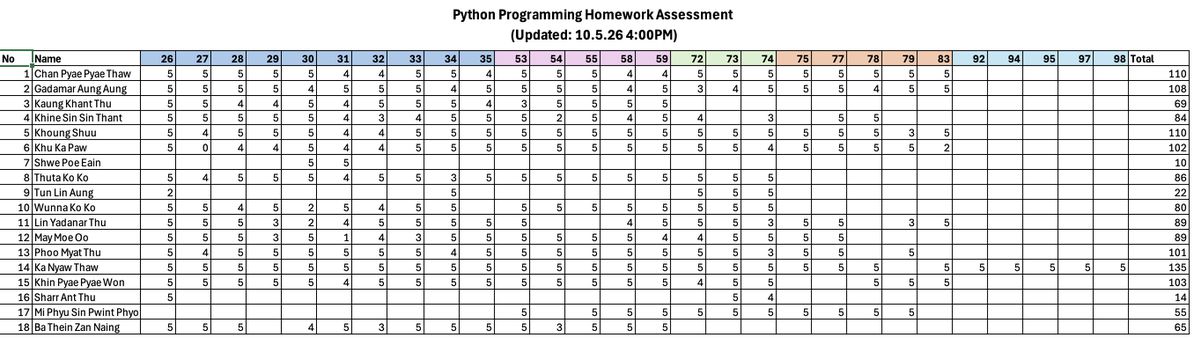
Enter a number: 5
Factorial = 120
Advanced Output:
Enter a number: 5
5!= 5 * 4 * 3 * 2 * 1 = 120
44. Find Maximum and Minimum of 10 Numbers (max_min_10_numbers.py)
Problem:
Write a program to accept 10 numbers from the user.
Find and display the maximum number and minimum number among them.
Sample Output:
Enter number 1: 15
Enter number 2: 8
Enter number 3: 23
Enter number 4: 4
Enter number 5: 17
Enter number 6: 9
Enter number 7: 30
Enter number 8: 12
Enter number 9: 6
Enter number 10: 20
Maximum = 30
Minimum = 4
45. Count Even and Odd Numbers of 10 Numbers (count_even_odd_10_numbers.py)
Problem:
Write a program to accept 10 numbers from the user.
Count and display how many numbers are even and how many are odd.
Enter number 1: 5
Enter number 2: 8
Enter number 3: 12
Enter number 4: 7
Enter number 5: 10
Enter number 6: 3
Enter number 7: 6
Enter number 8: 9
Enter number 9: 2
Enter number 10: 11
Even count = 5
Odd count = 5
Problem Set
Level (4)
46. Stop When Enter 0 (stop_at_zero.py)
Problem:
Keep asking the user to enter a number.
Stop the program when the user enters 0.
Sample Output:
Enter number: 5
You entered: 5
Enter number: 3
You entered: 3
Enter number: 0
Program ended
47. Continue with y/n (hello_repeat.py)
Problem:
Ask the user to enter their name and print a greeting.
Ask if they want to continue (y/n).
Sample Output:
Enter your name: Aung
Hello Aung
Continue? (y/n): y
Enter your name: Su
Hello Su
Continue? (y/n): n
Program ended
48. Even or Odd Repeater (even_odd_repeat.py)
Problem:
Ask the user for a number and print whether it is even or odd.
Repeat until the user chooses n.
Sample Output:
Enter number: 4
Even
Continue? (y/n): y
Enter number: 7
Odd
Continue? (y/n): n
49. Sum Until Stop (sum_until_zero.py)
Problem:
Keep asking numbers and calculate the total.
Stop when user enters 0.
Sample Output:
Enter number: 5
Enter number: 3
Enter number: 2
Enter number: 0
Total = 10
50. Multiplication Table (table_repeat.py)
Problem:
Ask the user for a number and display its multiplication table (1 to 5).
Ask if they want to continue.
Sample Output:
Enter number: 3
3 x 1 = 3
3 x 2 = 6
3 x 3 = 9
3 x 4 = 12
3 x 5 = 15
Continue? (y/n): n
51. Password Until Correct (password_loop.py)
Problem:
Keep asking the user to enter a password.
Stop only when the correct password (1234) is entered.
Sample Output:
Enter password: 1111
Wrong password
Enter password: 1234
Access granted
52. Count Positive Numbers (count_positive.py)
Problem:
Ask the user to enter numbers.
Count how many positive numbers are entered.
Stop when user enters 0.
Sample Output:
Enter number: 5
Enter number: -2
Enter number: 3
Enter number: 0
Positive count = 2
53. Guess the Number (guess_game.py)
Problem:
The program has a fixed number (e.g., 7).
Keep asking the user to guess until correct.
Sample Output:
Guess number: 3
Wrong
Guess number: 5
Wrong
Guess number: 7
Correct!
54. Simple Calculator Loop (calculator_menu.py)
Problem:
Create a menu:
1. Add
2. Subtract
3. Exit
Repeat until user chooses Exit.
Sample Output:
1. Add
2. Subtract
3. Exit
Choose: 1
Enter two numbers: 3 2
Result = 5
Choose: 3
Program ended
55. Find Maximum Number (find_max.py)
Problem:
Keep asking numbers and find the largest number.
Stop when user enters 0.
Sample Output:
Enter number: 5
Enter number: 9
Enter number: 3
Enter number: 0
Maximum = 9
56. Print Squares
(square_numbers.py)
Print square of numbers from 1 to 10.
Output:
1 4 9 16 …
57. Count Numbers Divisible by 3
(count_divisible_by_3.py)
Count how many numbers from 1 to 50 are divisible by 3.
58. Print Triangle
(triangle_pattern.py)
Output:
Enter number: 5
*
**
***
****
*****
59. Reverse Triangle
(reverse_triangle.py)
Output:
Enter number: 5
*****
****
***
**
*
Problem Set
Level 5
🧩 Exercise 60 – Name Analyzer (name_analyzer.py)
Problem
Ask the user to enter their name.
Display:
- name in uppercase
- name in lowercase
- number of characters
Then:
- if the name length is more than 5 → print "Long name"
- otherwise → print "Short name"
Sample Output
Enter name: Michael
Uppercase: MICHAEL
Lowercase: michael
Length: 7
Long name
🧩 Exercise 61 – Letter Counter (letter_counter.py)
Problem
Ask the user to enter a word.
Count how many times the letter "a" appears.
Then:
- if count > 2 → print "Many a's"
- else → print "Few a's"
Use a loop to count (not just count()).
Sample Output
Enter word: banana
Number of 'a': 3
Many a's
🧩 Exercise 62 – Password Checker (password_checker.py)
Problem
Keep asking the user to enter a password until it is valid.
Rules:
- length must be at least 6
- must contain the letter "@"
Use:
- len()
- find() or "@" in password
- loop
Sample Output
Enter password: abc
Invalid password
Enter password: abc123
Invalid password
Enter password: abc@123
Valid password
🧩 Exercise 63 – Sentence Cleaner (sentence_cleaner.py)
Problem
Ask the user to enter a sentence.
Then:
- remove extra spaces using strip()
- replace the word "bad" with "good"
- display the cleaned sentence
Then:
- if the sentence contains "good" → print "Positive sentence"
- else → print "Neutral sentence"
Sample Output
Enter sentence: This is a bad day
Cleaned: This is a good day
Positive sentence
🧩 Exercise 64 – Vowel Counter (vowel_counter.py)
Problem
Ask the user to enter a word.
Count how many vowels are in the word:
a, e, i, o, u
Use:
- loop
- lower()
Then display:
- total vowels
- if vowels ≥ 3 → "Many vowels"
- else → "Few vowels"
Sample Output
Enter word: Education
Vowels: 5
Many vowels
🧩 Chellenge Exercise
Exercise 65 – Username & Password Validator (login_validator.py)
📝 Problem
Write a program to check whether a username and password are valid.
Rules:
Username:
- Must contain "@"
- Must contain "."
Example of valid username:
eimon@gmail.com
Password:
- Must be at least 8 characters long
- Must contain only letters and numbers (no symbols)
Program Behavior:
- Keep asking the user until both username and password are valid
- Display appropriate messages
Sample Output
Enter username: eimon
Invalid username
Enter username: eimon@gmail
Invalid username
Enter username: eimon@gmail.com
Enter password: abc
Invalid password
Enter password: abc@12345
Invalid password
Enter password: abc12345
Valid login details
Problem Set
Level 6 (List)
🧩 Exercise 66 – Student Names & Marks (Parallel List)
Problem
Create two lists:
- one for student names
- one for their marks
Input 3 students’ data.
Display:
- each student with their mark
Sample Output
Student Report
John - 80
Anna - 90
Mike - 75
🧩 Exercise 67 – Total Sales Calculator
Problem
Create a list of 5 sales amounts (input from user).
Calculate:
- total sales
- count how many sales are above 100
Sample Output
Total Sales: 450
Sales above 100: 2
🧩 Exercise 68 – Even & Odd Counter
Problem
Input 5 numbers into a list.
Count:
- how many are even
- how many are odd
Sample Output
Even numbers: 3
Odd numbers: 2
🧩 Exercise 69 – Product Price Finder (Parallel List)
Problem
Create two lists:
- product names
- product prices
Input 4 products.
Ask user to enter a product name to search.
Display:
- price if found
- otherwise print “Product not found”
Sample Output
Enter product to search: Pen
Price: 10
🧩 Exercise 70 – Highest & Lowest Number
Problem
Input 5 numbers into a list.
Find:
- highest number
- lowest number
Sample Output
Highest: 90
Lowest: 10
Parallel Arrays + Table Output Exercises (71–80)
🧩 Exercise 71 – Student Marks Table (student_marks_table.py)
Problem Statement
Create two lists of student names and their marks.
Display a formatted table showing:
-
Name (left aligned)
-
Mark (right aligned)
-
Grade:
-
A (>=80)
-
B (>=60)
-
C (<60)
-
Given Data
names = ["Alice", "Bob", "Charlie"]
marks = [85, 72, 55]
Expected Output
Name           Mark   Grade
----------------------------
Alice            85   A
Bob              72   B
Charlie          55   C
🧩 Exercise 72 – Product Price List (product_price_table.py)
Problem Statement
Create two lists for product names and prices.
Display a formatted table and calculate the total price.
Given Data
products = ["Mouse", "Keyboard", "Monitor"]
prices = [15.5, 25.0, 120.75]
Expected Output
Product        Price
----------------------
Mouse          15.50
Keyboard       25.00
Monitor       120.75
----------------------
Total         161.25
🧩 Exercise 73 – Attendance Report (attendance_report.py)
Problem Statement
Create two lists for student names and attendance status.
Display a table and count how many students are present.
Given Data
students = ["John", "Anna", "Mike"]
attendance = ["Present", "Absent", "Present"]
Expected Output
Student        Status
-------------------------
John           Present
Anna           Absent
Mike           Present
-------------------------
Total Present: 2
🧩 Exercise 74 – Shop Receipt Table (shop_receipt.py)
Problem Statement
Create three lists for items, quantity, and price.
Display a receipt table including subtotal and total.
Given Data
items = ["Pen", "Book", "Bag"]
quantity = [2, 1, 1]
price = [1.5, 5.0, 20.0]
Expected Output
Item         Qty   Price   Subtotal
--------------------------------------
Pen            2    1.50      3.00
Book           1    5.00      5.00
Bag            1   20.00     20.00
--------------------------------------
Total                 28.00
🧩 Exercise 75 – Temperature Report (temperature_table.py)
Problem Statement
Create two lists for days and temperatures.
Display a table and find the highest temperature.
Given Data
days = ["Mon", "Tue", "Wed", "Thu"]
temperatures = [30, 32, 29, 35]
Expected Output
Day         Temp
-------------------
Mon           30
Tue           32
Wed           29
Thu           35
-------------------
Highest Temp: 35
🔄 USER INPUT SECTION
🧩 Exercise 76 – Student Input Table (student_input_table.py)
Problem Statement
Ask the user to enter student names and marks.
After each student input, ask the user “Do you want to continue (yes/no): ”
If the user input “yes”, then request input for another student.
If the user input “no”, stop input.
Store the inputted data in the lists, students[] and marks[].
Calculate the grade for each student and store the result in the list grades[].
The grade rules are:
80 and above = “A”
60 to 79 = “B”
50 to 59 = “C”
Below 50 = “F”
Then, display the result table as shown in expected output.
Sample Input
Enter name: Alice
Enter mark: 80
Do you want to continue (yes/no)? yes
Enter name: Bob
Enter mark: 60
Do you want to continue (yes/no)? yes
Enter name: Chris
Enter mark: 45
Do you want to continue (yes/no)? no
Expected Output
                  Name           Mark   Grade
----------------------------
Alice            80   A
Bob              60   B
Chris            45   C
🧩 Exercise 77 – Shopping Cart Input (shopping_cart.py)
Problem Statement
Write a Python program to input product names and prices.
Ask the user to enter a product name
Ask the user to enter the product price
After each entry, ask: “Do you want to enter another (yes/no)?”
If the user enters “yes”, continue input
If the user enters “no”, stop input
Processing
Store all product names in a list called products
Store all prices in a list called prices
Calculate the total cost of all products
Sample Input
Enter product: Pen
Enter price: 1.5
Do you want to enter another (yes/no)? yes
Enter product: Book
Enter price: 5
Do you want to enter another (yes/no)? yes
Enter product: Bag
Enter price: 20
Do you want to enter another (yes/no)? no
Expected Output
                    Product        Price
----------------------
Pen             1.50
Book            5.00
Bag            20.00
----------------------
Total          26.50
🧩 Exercise 78 – Score Comparison Table (score_comparison.py)
Problem Statement
Ask the user to enter the student names and scores.
The input will continue until the user enter “no” in “Do you want to continue (yes/no)?”.
Store the student names into the list, students[], and scores into the list, scores[].
Then calculate the result and store in the list, results[].
Also count total passes (>=50) and total fails (<50).
In addition, find the average mark of the student.
Sample Input
Enter name: Aung
Enter score: 60
Do you want to continue (yes/no)? yes
Enter name: Mya
Enter score: 45
Do you want to continue (yes/no)? yes
Enter name: Tun
Enter score: 80
Do you want to continue (yes/no)? yes
Enter name: Hla
Enter score: 30
Do you want to continue (yes/no)? no
Expected Output
                  Name         Score   Result
----------------------------
Aung            60   Pass
Mya             45   Fail
Tun             80   Pass
Hla             30   Fail
----------------------------
Total Pass: 2
Total Fail: 2
Average Mark: 53.75
🧩 Exercise 79 – Salary Report (salary_report.py)
Problem Statement
Ask the user to enter how many employee, their names and salaries and store them in the lists.
Then, Calculate bonus:
>=500 → 10%
<500 → 5%
Display salary, bonus, total, and average.
Sample Input
How many employee: 3
Enter name: John
Enter salary: 600
Enter name: Anna
Enter salary: 400
Enter name: Mike
Enter salary: 500
Expected Output
Name         Salary    Bonus    Total
---------------------------------------
John            600    60.00   660.00
Anna            400    20.00   420.00
Mike            500    50.00   550.00
---------------------------------------
Average         500    40.00   543.33
🧩 Exercise 80 – Mini Report System (mini_report_system.py) ⭐
Problem Statement
Ask the user to enter item name, quantity and price for 5 items:
Store them in parallel lists.
Display a full table with subtotal, total cost, and most expensive item.
Sample Input
Enter item: Pen
Enter qty: 2
Enter price: 1.5
Enter item: Book
Enter qty: 1
Enter price: 5
Enter item: Bag
Enter qty: 1
Enter price: 20
Enter item: Bottle
Enter qty: 3
Enter price: 2
Enter item: Pencil
Enter qty: 5
Enter price: 0.5
Expected Output
Item         Qty   Price   Subtotal
--------------------------------------
Pen            2    1.50      3.00
Book           1    5.00      5.00
Bag            1   20.00     20.00
Bottle         3    2.00      6.00
Pencil         5    0.50      2.50
--------------------------------------
Total                 36.50
Most Expensive Item: Bag
2D Array Exercises
🧩 Exercise 81 – Student Subject Total (student_subject_total.py)
Problem Statement
A 2D list contains marks of students in 3 subjects.
marks = [
[80, 70, 90],
[60, 75, 85],
[88, 92, 79]
]
Calculate the total marks for each student and display in table format.
Expected Output
Student    Total
------------------
Student 1   240
Student 2   220
Student 3   259
🧩 Exercise 82 – Student Average Marks (student_average.py)
Problem Statement
Using the same 2D list:
marks = [
[80, 70, 90],
[60, 75, 85],
[88, 92, 79]
]
Calculate the average mark for each student and display in table format.
Expected Output
Student    Average
----------------------
Student 1   80.00
Student 2   73.33
Student 3   86.33
🧩 Exercise 83 – Product Sales Total (product_sales.py)
Problem Statement
A 2D list contains product names and quantities sold in 3 days.
products = [
["Pen", 10, 15, 20],
["Book", 5, 7, 9],
["Bag", 2, 3, 4]
]
Calculate the total quantity sold for each product and display in table format.
Expected Output
Product    Total Sold
------------------------
Pen                45
Book               21
Bag                 9
🧩 Exercise 84 – Dynamic Student Marks with Total (input_student_total.py)
Problem Statement
Write a program to:
Input student name and 3 subject marks
Store data in a 2D list
Continue input until user enters “no”
Then:
Calculate total marks
Display in table format
Sample Input
Enter name: Alice
Enter mark1: 80
Enter mark2: 70
Enter mark3: 90
Continue? (yes/no): yes
Enter name: Bob
Enter mark1: 60
Enter mark2: 75
Enter mark3: 85
Continue? (yes/no): no
Expected Output
Name      Total
------------------
Alice     240
Bob       220
🧩 Exercise 85 – Dynamic Shopping Cart with Total (input_cart_total.py)
Problem Statement
Write a program to:
Input product name and price
Store in a 2D list
Continue until user enters “no”
Then:
Display product table
Calculate total cost
Sample Input
Enter product: Pen
Enter price: 1.5
Continue? (yes/no): yes
Enter product: Book
Enter price: 5
Continue? (yes/no): no
Expected Output
Product        Price
------------------------
Pen             1.50
Book            5.00
------------------------
Total           6.50
Problem Set
Level 7 (Functions)
🧩 Exercise 86 – Student Greeting System (student_greeting_system.py)
Problem Statement
Create these functions:
line()
greet(name)
Function Details
line() displays:
---------------------------
greet(name) displays:
Hello <name>
Welcome to Python Class
Input 3 student names using a loop and call the functions each time.
Sample Output
Enter Your Name: Alice
---------------------------
Hello Alice
Welcome to Python Class
---------------------------
Enter Your Name: Bob
---------------------------
Hello Bob
Welcome to Python Class
---------------------------
Enter Your Name: Thomas
---------------------------
Hello Thomas
Welcome to Python Class
---------------------------
🧩 Exercise 87 – Rectangle Calculator System (rectangle_system.py)
Problem Statement
Create these functions:
area(length, width)
perimeter(length, width)
Calculate and display:
area
perimeter
Call both functions.
Sample Output
Enter length: 5
Enter width: 4
Area = 20
Perimeter = 18
🧩 Exercise 88 – Student Grade Report (student_grade_report.py)
Problem Statement
Create these functions:
grade(mark)
result(mark)
Function Details
grade(mark) returns grade A/B/C/F
result(mark) returns Pass or Fail
Input 5 student marks using a loop.
Display:
mark
grade
result
Call both functions for every student.
Sample Output
Enter mark: 85
Grade = A
Result = Pass
Enter mark: 62
Grade = B
Result = Pass
Enter mark: 45
Grade = F
Result = Fail
🧩 Exercise 89 – Shopping Cart Receipt System (shopping_receipt_system.py)
Problem Statement
Create these functions:
subtotal(qty, price)
line()
Input 3 products:
name
quantity
price
Display a formatted receipt table.
Call:
subtotal() for each product
line() multiple times
Sample Output
Enter item: Pen
Enter quantity: 2
Enter price: 1.5
Enter item: Book
Enter quantity: 1
Enter price: 5
Enter item: Bag
Enter quantity: 1
Enter price: 20
------------------------------
Item Qty Price Total
------------------------------
Pen 2 1.50 3.00
Book 1 5.00 5.00
Bag 1 20.00 20.00
------------------------------
Grand Total = 28.00
🧩 Exercise 90 – Login Validation System (login_validation_system.py)
Problem Statement
Create these functions:
check_username(username)
check_password(password)
Rules
Username:
must be "admin"
Password:
must be "1234"
Display:
Login successful
Wrong password
Unknown user
Call the functions separately inside the main program.
Sample Output
Enter username: admin
Enter password: 1234
Login successful
🧩 Exercise 91 – Multiplication Table Menu (table_menu_system.py)
Problem Statement
Create these functions:
table(number)
menu()
Use a loop menu system.
If user chooses 1:
input a number
call table()
Repeat until Exit.
Sample Output
1. Show Table
2. Exit
Choose: 1
Enter number: 3
3 x 1 = 3
3 x 2 = 6
3 x 3 = 9
3 x 4 = 12
3 x 5 = 15
1. Show Table
2. Exit
Choose: 2
Program ended
🧩 Exercise 92 – Employee Salary Report (employee_salary_report.py)
Problem Statement
Create these functions:
bonus(salary)
total_salary(salary)
Rules
Bonus:
salary >= 500 → 10%
otherwise → 5%
Input 3 employee salaries.
Display:
salary
bonus
total salary
Call both functions for every employee.
Sample Output
Enter salary: 600
Enter salary: 400
Enter salary: 500
Salary   Bonus   Total
------------------------
600      60      660
400      20      420
500      50      550
🧩 Exercise 93 – Number Analysis System (number_analysis_system.py)
Problem Statement
Create these functions:
is_even(number)
is_positive(number)
Function Details
is_even() returns True/False
is_positive() returns True/False
Input 5 numbers using a loop.
Display:
Even/Odd
Positive/Negative
Call both functions for every number.
Sample Output
Enter number: 8
Even
Positive
Enter number: -5
Odd
Negative
🧩 Exercise 94 – Student Report Table System (student_report_table_system.py)
Problem Statement
Create these functions:
grade(mark)
display_line()
Input:
5 student names
5 marks
Display a formatted report table.
Call:
grade() for each student
display_line() multiple times
Sample Output
Enter name: Alice
Enter mark: 85
Enter name: Bob
Enter mark: 60
Enter name: Chris
Enter mark: 45
--------------------------------
Name        Mark      Grade
--------------------------------
Alice        85         A
Bob          60         B
Chris        45         F
--------------------------------
🧩 Exercise 95 – Password Strength Checker System (password_strength_system.py)
Problem Statement
Create these functions:
check_length(password)
check_symbol(password)
Rules
length >= 6
password must contain “@”
Use a loop to repeatedly ask for password until valid.
Call both functions every time the user inputs a password.
Sample Output
Enter password: abc
Too short
Missing @
Enter password: abc123
Missing @
Enter password: abc@123
Valid password
🧩 Exercise 96 – Product Price Finder System (product_price_finder.py)
Problem Statement
Create these functions:
search_product(products, target)
display_products(products, prices)
Create parallel lists:
products
prices
Display all products.
Ask user to search a product.
Use search_product() to find and display the price.
Sample Output
Product      Price
--------------------
Pen          1.50
Book         5.00
Bag         20.00
Enter product: Book
Price = 5.00
🧩 Exercise 97 – Prime & Factorial System (prime_factorial_system.py)
Problem Statement
Create these functions:
is_prime(number)
factorial(number)
Input a number.
Display:
whether it is prime
factorial of the number
Call both functions.
Sample Output
Enter number: 5
Prime Number
Factorial = 120
🧩 Exercise 98 – ATM System (atm_system.py)
Problem Statement
Create these functions:
check_balance(balance, amount)
withdraw(balance, amount)
Rules
if withdrawal > balance → Insufficient balance
otherwise → deduct amount
Use the functions to process withdrawal.
Sample Output
Enter balance: 500000
Enter withdrawal amount: 200000
Withdrawal successful
Remaining balance = 300000
🧩 Exercise 99 – 2D Student Mark Analysis (student_mark_analysis.py)
Problem Statement
Create these functions:
student_total(data)
student_average(data)
A 2D list contains marks of students.
Call both functions for every student.
Given Data
marks = [
[80, 70, 90],
[60, 75, 85],
[88, 92, 79]
]
Expected Output
Student 1
Total = 240
Average = 80.00
Student 2
Total = 220
Average = 73.33
Student 3
Total = 259
Average = 86.33
🧩 Exercise 100 – Mini School Management System ⭐ (mini_school_system.py)
Problem Statement
Create these functions:
line()
grade(mark)
result(mark)
student_report(name, mark)
Input 5 students:
name
mark
Display a complete report table.
Call:
line() many times
grade()
result()
student_report() for every student
Expected Output
Enter name: Alice
Enter mark: 85
Enter name: Bob
Enter mark: 62
Enter name: Chris
Enter mark: 40
-----------------------------------------------
Name         Mark      Grade      Result
-----------------------------------------------
Alice          85         A        Pass
Bob            62         B        Pass
Chris          40         F        Fail
-----------------------------------------------
Python Programming Homework Assessment